








































Santo Domingo, Dominican Republic. – Searching for information, copying it, opening another app, and creating a reminder: completing a simple task on your phone can require several steps. Agentic artificial intelligence aims to simplify this process, helping the user move from instruction to action.
Unlike a tool that simply generates answers, an assistant with agentic capabilities can execute tasks in compatible apps, based on user permissions and instructions. On Galaxy devices with One UI 9, this evolution is combined with organizational features and contextual suggestions to simplify everyday activities.
PFor those looking to take advantage of these possibilities in the Galaxy Z8 Series and the Galaxy S26 FE, the starting point is to identify small, repetitive tasks that can be resolved with fewer interventions.
- Turn an instruction into an organized to-do list
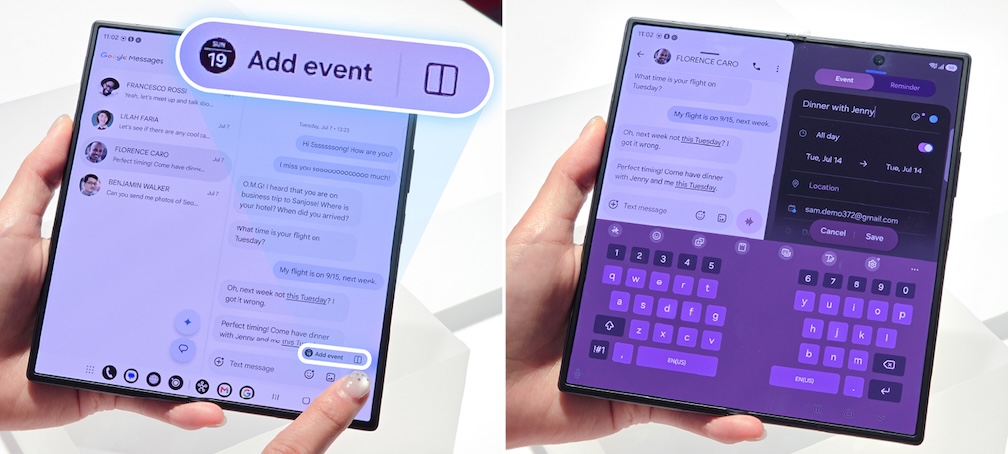
When a task arises, recording it immediately can prevent it from getting lost among messages and notifications. In compatible apps, Gemini allows you to create entries in Samsung services like Calendar or Reminder using natural language commands.
To test it, open Gemini and request a specific action, for example: “Set a reminder to review the presentation tomorrow at nine in the morning”. Specify the task, day, and time; then, verify that it has been correctly registered in the corresponding application.
The benefit lies in reducing the steps between remembering something and putting it in order. The availability of these actions depends on the applications, permissions, and device settings.
- Take advantage of the suggestions that appear when you need them.
AIn addition to asking for help, it is possible to receive suggestions related to what is happening on the screen. Now Nudge It offers contextual recommendations to facilitate the next step and reduce the need to search for information manually.
With One UI 9, this feature expands its reach to certain third-party apps and notifications. To take advantage of it, pay attention to the suggestions available during your activities and review their content before using them.
On the Galaxy S26 FE, Now Nudge is part of the Galaxy AI experiences designed to keep the user organized and make their routines easier.
- Personalize the information you start your day with.
A productive agenda also depends on quickly finding what matters. Now Brief It gathers personalized information through cards that can be adapted to the user's interests, with content such as weather and wellness data.
EOn the Galaxy S26 FE with One UI 9, you can create cards with a simple instruction. It's recommended to start with information that truly impacts your routine: for example, checking the weather before heading out.
This personalization complements the assistant's actions: it helps to have context before deciding what to do.
- Combine AI assistance with your phone's form factor
The Galaxy Z8 Series allows you to take advantage of these tools through different user experiences. In the Galaxy Z Fold8 Ultra, The main screen and multi-window options make it easy to view applications side-by-side. This is useful for comparing information, reviewing a document, and keeping another work tool in view.
He Galaxy Z Fold8 It offers a wide-format fold-out screen for viewing content, while the Galaxy Z Flip8 It allows access to compatible apps, notifications, and widgets from your FlexWindow.
GAlaxy S26 FE, It incorporates One UI 9 from launch and brings together tools like Now Brief and Now Nudge in a conventional format. This allows each user to integrate AI assistance into a workflow that suits their preferences.
- Review what actions your assistant took.
Delegating tasks also requires visibility. One UI 9 incorporates AI Assistant Activity, a panel that allows you to view the compatible actions that attendees performed in applications, along with their time logs.
To check it, go to Settings > Security and privacy > AI assistant activity and select the available assistant. Menu names may vary depending on the language, model, and software version.
This log helps verify what has been done and understand how the support features are being used. It does not replace reviewing the results: it is advisable to confirm dates, times, and the content of important tasks.
The best way to start is to choose a specific task, give clear instructions, and check the result. With this practice, agentic AI can become a practical tool for reducing repetitive tasks and allowing you to dedicate more time to work, studies, or personal projects.
LFeature availability may vary depending on country, language, model, software version, and compatible apps. Some features require an internet connection, login to Samsung or Google accounts, and specific permissions. The AI results need to be reviewed.
Source: Samsung
